

Download WRAL Weather – Free Weather App for iPhone, Real-Time Forecasts, Local Alerts
Overview
WRAL Weather is a free mobile application designed for users in North Carolina seeking accurate, localized weather information. Developed by Capitol Broadcasting Company, the app serves as a digital weather companion for residents and visitors across the state’s coverage area. It provides real-time weather updates, detailed local forecasts, and timely weather alerts tailored to specific regions within North Carolina. The app is particularly useful for individuals who rely on up-to-the-minute meteorological data for daily planning, outdoor activities, travel, or emergency preparedness. Its primary purpose is to deliver reliable weather intelligence directly to iPhone, iPad, and iPod touch users through a streamlined interface.
Target users include homeowners, commuters, event planners, farmers, and anyone who needs to stay informed about changing weather conditions. The app’s focus on regional accuracy makes it a valuable tool for communities across the state, especially during storm seasons or extreme weather events. While the developer is known for its media presence in North Carolina, specific details about the company’s broader software development history were not provided. The application is available exclusively through the Apple App Store, ensuring secure distribution and regular updates.
Key Features & Capabilities
- Real-Time Weather Updates: The app delivers current weather conditions, including temperature, humidity, wind speed, and precipitation levels, updated frequently to reflect on-the-ground changes.
- Localized Forecasts: Users receive hyperlocal forecasts tailored to their specific zip code or location, improving accuracy compared to broader regional predictions.
- Weather Alerts: Instant notifications for severe weather events such as thunderstorms, tornadoes, flash floods, and winter storms are issued directly to users within affected zones.
- Interactive Radar and Satellite Views: Visual tools allow users to track storm systems, precipitation movement, and cloud cover in real time using dynamic maps.
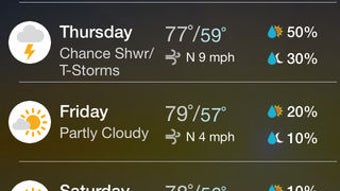
- 7-Day and Hourly Forecast Breakdowns: Detailed predictions are presented in both daily and hourly formats, helping users plan activities with precision.
These features support practical use cases such as deciding whether to delay a commute due to rain, preparing for a sudden drop in temperature, or evacuating during a storm warning. The integration of location-based services ensures that users receive data relevant to their immediate environment, reducing reliance on generalized forecasts. The app’s design prioritizes clarity and immediacy, making it suitable for both casual users and those requiring urgent weather information.
User Interface, Workflow & Performance
The user interface of WRAL Weather is designed with clarity and functionality in mind, featuring a clean layout that emphasizes readability and quick access to critical data. Navigation is intuitive, with a bottom menu bar offering direct access to forecast, radar, alerts, and settings. The main screen displays current conditions at a glance, while swiping between tabs reveals deeper layers of information. The workflow is streamlined, allowing users to view hourly forecasts, activate alerts, and toggle between map views with minimal taps.
Performance is expected to be responsive given the app’s focus on real-time data delivery. While specific performance metrics such as CPU or RAM usage were not disclosed, the app’s design suggests efficient handling of live data streams and map rendering. Stability appears consistent with typical Apple App Store applications, particularly those developed by established media companies. Users can expect minimal lag during map interactions and smooth transitions between forecast views. The developer did not specify resource usage details, but the app’s size of 108.9 MB indicates moderate storage requirements.
Compatibility & System Requirements
WRAL Weather is compatible with iPhone, iPad, and iPod touch devices. The current version is 1.5, released on January 10, 2023. The app requires a minimum of 108.9 MB of storage space for installation. Platform compatibility information is limited to Apple’s mobile ecosystems, with no support for Windows, Mac, or other operating systems. The developer did not provide additional system requirements such as minimum iOS version or hardware specifications.
Users should ensure their device is running a supported version of iOS to maintain optimal functionality. Since the app is distributed through the Apple App Store, compatibility is generally maintained across recent devices. However, older models may experience reduced performance or feature limitations. The developer did not specify whether background refresh or push notifications require specific device settings, but these are standard features in similar weather apps.
Pros and Cons
Pros
- Free to download and use with no hidden costs
- Provides accurate, localized weather data for North Carolina
- Delivers real-time updates and timely severe weather alerts
- Intuitive interface with easy navigation and clear visualizations
- Offers interactive radar and satellite imagery for tracking storms
Cons
- Geographic availability is limited to North Carolina
- App size is relatively large at 108.9 MB
- Only available on Apple’s mobile platforms, not on Android or desktop
- Does not support offline weather data viewing
- Exact system requirements were not specified
FAQ Section
Is WRAL Weather available for Android devices?
No, the app is currently only available for iPhone, iPad, and iPod touch through the Apple App Store.
Can I use WRAL Weather without an internet connection?
While the app requires an active internet connection to fetch real-time data, some cached information may be accessible briefly after the last update. However, full functionality depends on online access.
How often are weather updates refreshed?
Weather data is updated frequently throughout the day to reflect current conditions and forecast changes, though the exact refresh interval was not specified by the developer.
Is the app safe to download and use?
Yes, WRAL Weather is distributed through the official Apple App Store, ensuring it has undergone Apple’s security review process and is free from known malware.
Does WRAL Weather support multiple locations?
The app is optimized for users in North Carolina. While it may allow location switching, its primary focus and data accuracy are centered on the state’s coverage area.
Final Thoughts + CTA
WRAL Weather stands out as a reliable, free weather tool tailored specifically for North Carolina residents. Its combination of real-time updates, localized forecasts, and timely alerts makes it a practical choice for anyone needing accurate weather intelligence. The app’s clean interface and efficient workflow enhance usability, while its integration with Apple’s ecosystem ensures a stable experience. Although it lacks cross-platform availability and offline functionality, its strengths in regional accuracy and alert delivery outweigh these limitations for its intended audience.
For users in North Carolina seeking a trustworthy, no-cost weather solution, WRAL Weather delivers consistent value. Download WRAL Weather now to stay informed and prepared for every forecast, every day.







